- METR’s July 2025 study found experienced developers believed AI made them ~20% faster, but measured task completion was ~19% slower.
- The slowdown comes from “edge” work around AI output—reviewing, correcting subtle mistakes, re-prompting, and debugging unfamiliar failure modes—which compounds across a task.
- There’s a hidden cognitive cost: reviewing AI-generated code requires active comprehension and rebuilding a mental model, which developers systematically underestimate.
- The perception gap is driven by anchoring and availability bias—developers remember the flashy speedups (boilerplate, stubs) and discount the quiet time sinks (verification and fixes).
- AI tends to help most with low-ambiguity, easy-to-verify tasks (boilerplate, tests, docs, bug explanation) and can hurt on high-context work (complex business logic, greenfield architecture, performance tuning).

Every developer I know will tell you the same thing: AI coding tools make them faster. The boilerplate writes itself, the test stubs appear like magic, the regex they'd normally spend fifteen minutes on shows up in seconds. You finish a task, lean back, and think, that would have taken me twice as long without Copilot. Or Claude. Or Cursor.
Then METR ran the numbers.
In July 2025, the Model Evaluation & Threat Research group published a study that quietly wrecked the AI-assisted development narrative. They took experienced developers, people with deep familiarity in their own codebases, and measured actual task completion times with and without AI tools. The developers estimated AI made them about 20% faster. The measurements showed they were 19% slower.
Not break-even. Almost twenty percent slower while believing they were twenty percent faster. A nearly 40-point perception gap.
Where the time actually goes
So where does the time go? If AI tools generate code at machine speed, what's eating the clock?
The edges. AI is fast at producing output, but everything around that output, reviewing it, correcting subtle mistakes, re-prompting when the first result misses the mark, debugging errors you wouldn't have made yourself, all of that adds up. Invisibly. You fix a wrong import. You adjust a variable name. You realize the generated function doesn't handle the edge case your codebase requires. Each fix takes thirty seconds. Across a full task, those thirty-second corrections compound into minutes, and those minutes add up to slower.
There's a cognitive cost too, one that's harder to measure. When you write code yourself, you're building a mental model as you type. When you review AI-generated code, you're reverse-engineering someone else's mental model, except there is no mental model. The code was produced statistically. Understanding it well enough to trust it takes a different kind of attention. And experienced developers underestimate this badly, because reading code feels passive. It isn't.
| Activity | Perceived Time Cost | Actual Time Cost |
|---|---|---|
| Writing boilerplate manually | High | Moderate (you know the patterns) |
| Generating boilerplate with AI | Low | Low (genuine speed gain) |
| Reviewing AI-generated logic | Low | High (hidden comprehension cost) |
| Re-prompting after bad output | Low | Moderate to High (compounds quickly) |
| Debugging AI-introduced errors | Low | High (unfamiliar failure modes) |
| Context-switching between writing and reviewing | Negligible | Moderate (cognitive overhead) |
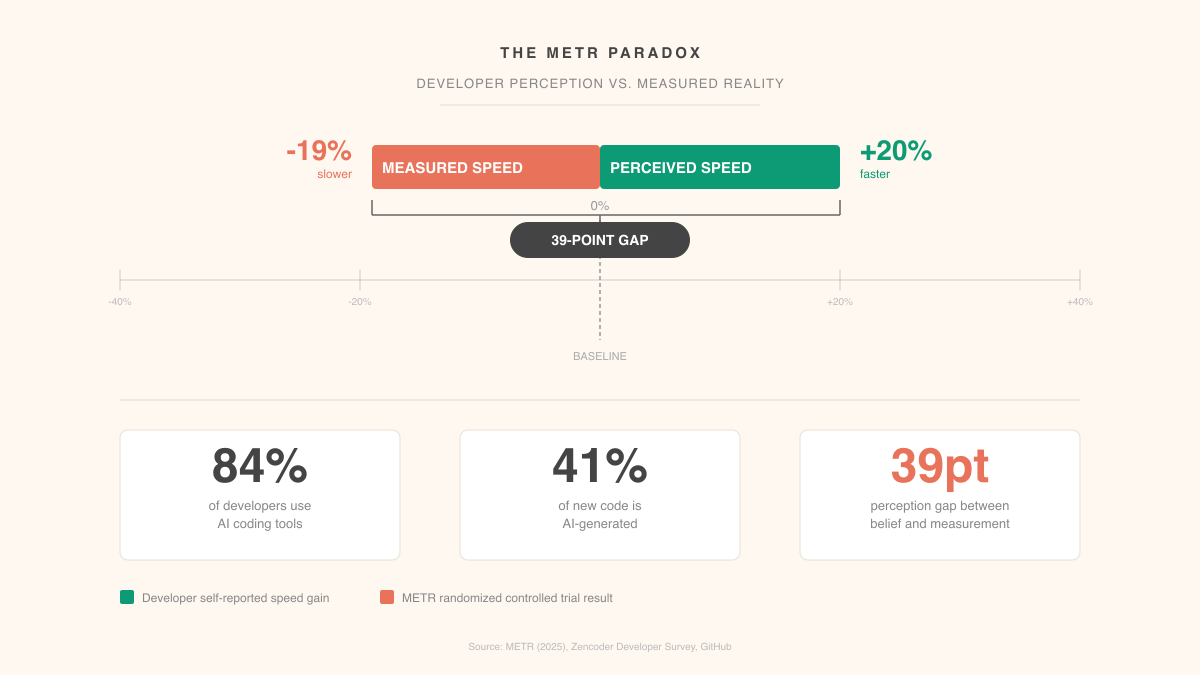
The perception gap comes down to anchoring. Developers remember the visible wins, fast boilerplate, instant test stubs, and discount the invisible losses, the review cycles, the re-prompts, the subtle bugs. Classic availability bias. The fast moments are memorable. The slow moments just blend into the background.
What AI actually accelerates
None of this means AI tools are useless. The METR study measured overall task completion, but break development work into its pieces and clear patterns show up.
| Task Type | AI Impact | Why |
|---|---|---|
| Boilerplate and scaffolding | Strong positive | Repetitive patterns, low ambiguity, easy to verify |
| Unit test generation | Strong positive | Formulaic structure, clear input/output contracts |
| Bug explanation and diagnosis | Strong positive | AI excels at pattern matching across large codebases |
| Code documentation | Strong positive | Descriptive task with clear reference material |
| Refactoring existing code | Moderate positive | Works when scope is narrow, struggles with broad changes |
| Greenfield architecture | Neutral to negative | Requires deep context AI doesn't have |
| Complex business logic | Negative | Domain-specific edge cases defeat generic models |
| Performance optimization | Negative | Requires runtime understanding AI can't access |
The pattern writes itself. AI accelerates what's repetitive, well-defined, and easy to verify. It slows down what requires deep context, judgment, or understanding of constraints that don't exist in the code. The problem? Experienced developers spend most of their time on the second category. Juniors spend more time on the first, which partly explains why some studies show different results for different experience levels.
The 2026 picture
By early 2026, things have shifted. 84% of developers now use AI coding tools, and those tools collectively write 41% of all new code. The tooling has genuinely improved since the METR study. Better context management, stronger first-pass accuracy, fewer hallucinated APIs.
Early 2026 data suggests the speed penalty has shrunk, and for certain task categories, it may have flipped into a real gain. But the perception gap? Still there. Developers still overestimate the benefit relative to what measurements show.
This matters because organizations are making staffing and planning decisions based on developer self-reports. If your team says AI gives them a 30% productivity boost and you plan your roadmap around that, but the actual boost is 10%, you're going to miss deadlines. Not because anyone lied. Because subjective perception is a terrible metric for something you can actually measure.
I find the market signal interesting here. The AI coding tools gaining the most traction in 2026 aren't the ones that generate the most code. They're the ones with better context management, fewer retries, stronger first passes. Developers are voting with their subscriptions for tools that reduce the hidden costs, even while underestimating those costs when asked directly.

The uncomfortable implication
The METR paradox points at something bigger than coding speed. Humans are poor judges of their own productivity when a tool changes the nature of the work itself.
When AI handles the typing, developers feel faster because typing was the visible bottleneck. But typing was never the actual bottleneck. Thinking was. Understanding the problem, designing the solution, anticipating edge cases. That's where development time lives. AI doesn't compress any of that. And by introducing a review-and-correct cycle that replaces a think-and-write cycle, it sometimes extends it.
I'm not making an argument against AI coding tools. I use them constantly, and they deliver genuine value for specific tasks. But trusting vibes over data is a problem. If your engineering leadership plans capacity around perceived productivity gains, they're making the same mistake as the METR study participants: confusing the feeling of speed with the fact of it.
The teams that'll get the most out of AI tools are the ones treating them with the same rigor they'd apply to any other engineering decision. Measure actual output. Figure out which task categories show real gains. Be honest about where the tools create drag.
The 40-point perception gap won't close on its own. You close it by measuring what you actually want to know, instead of asking people how they feel about it.
Use AI where verification is cheap and the task is formulaic—scaffolding, unit tests, documentation, and quick diagnostics—and be more cautious when the work depends on deep domain context or tricky edge cases. Build explicit time into your workflow for reviewing and testing AI output, and track actual end-to-end task time so you don’t confuse “fast typing” with real delivery speed. If you notice lots of re-prompts or subtle bug fixes, treat that as a signal to switch back to manual implementation or narrow the scope you’re asking the model to handle.